Publications

W2NAF and KM4EGE Win Yasme Foundation Excellence Award

The Yasme Foundation announced this past week that Nathaniel Frissell, W2NAF and Magda Moses, KM4EGE are winners of the 2017 Excellence Award for their role in starting HamSCI and organizing and promoting the Solar Eclipse QSO Party. From Yasme's Website, "The Yasme Excellence Awards are presented to individuals who through their own service, creativity, effort and dedication have made a significant contribution to amateur radio. The contribution may be in recognition of technical, operating or organizational achievement as all three are necessary for amateur radio to grow and prosper. These awards shall be given from time to time as the board feels appropriate."

HamSCI began in 2015 when Nathaniel saw Magda's undergraduate research poster on preparing to study ionospheric effects due to the (then upcoming) August 21, 2017 Total Solar Eclipse. Prior to that, Nathaniel had published work showing that observations from the Reverse Beacon Network could be used to to sense ionospheric changes due to Solar Flare effects. By working with people at Virginia Tech, the New Jersey Institute of Technology, the American Radio Relay League, the Reverse Beacon Network, and the ham radio community, the Solar Eclipse QSO Party became what is recognized by Yasme as the "the largest amateur radio experiment ever devised and generated the world’s most extensive set of HF propagation observations during an eclipse."

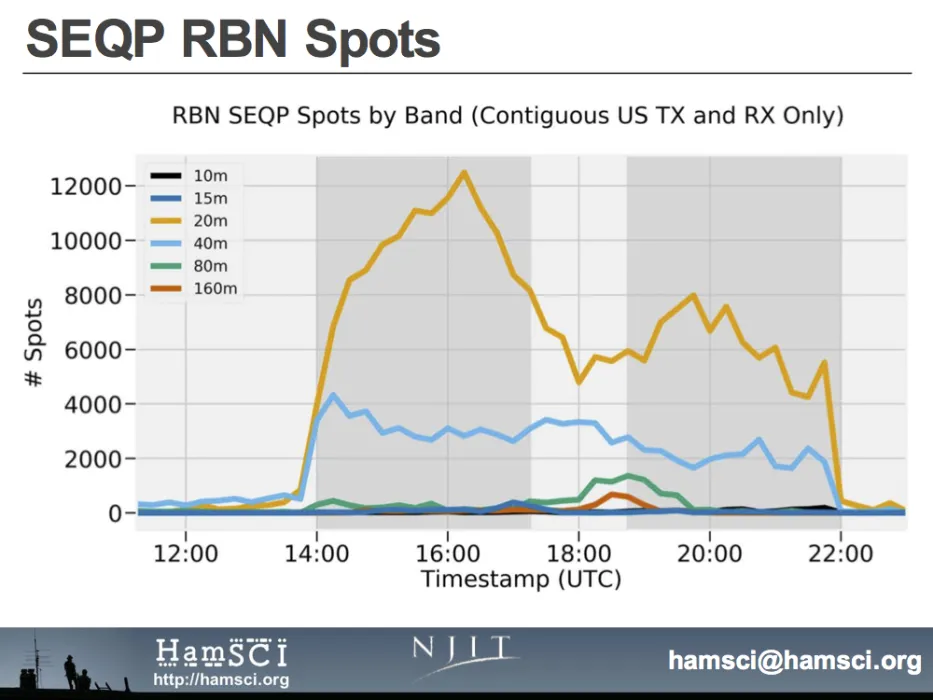
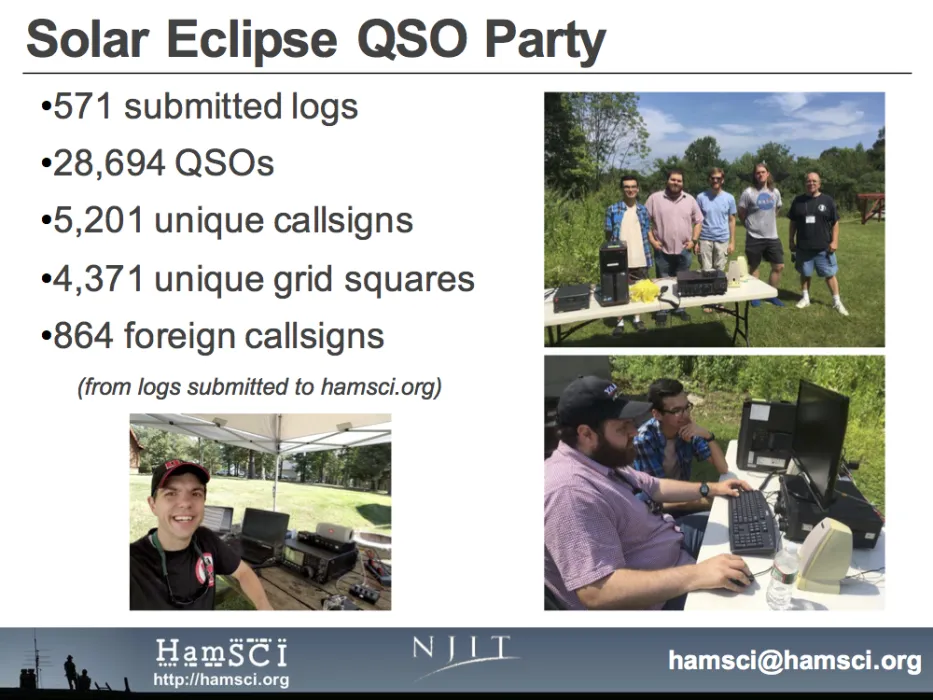
The SEQP generated over 30,000 QSOs, 618,000 RBN spots, 630,000 WSPR spots, and 1,237,000 PSKReporter spots. In total, over 2.5 million spots were recorded for the 8 hour duration of the SEQP. In addition, amateurs submitted terabytes worth of IQ-spectrum recordings and high-resolution HF frequency measurements to the HamSCI Zenodo Community Repository. Science teams at New Jersey Institute of Technology, Virginia Tech, and in the amateur radio community are now working on analyzing these observations. Initial results were presented at the Tuscan Amateur Packet Radio (TAPR) Digital Communications Conference and the HamSCI-UK Workshops. Presentations are also planned for the upcoming American Geophysical Union and American Meteorological Society meetings.

Amateurs who wish to learn more and/or present their findings are invited to do so at the upcoming HamSCI Workshop hosted by the New Jersey Institute of Technology (NJIT) from February 23 - 24, 2018. HamSCI is led from the New Jersey Institute of Technology by Nathaniel Frissell, who complete his Ph.D. in 2016 at Virginia Tech and is now a research professor at New Jersey Institute of Technology Center for Solar-Terrestrial Research.

HamSCI Workshop 2018 - Interest Survey

We are inviting all hams and scientists interested in ham radio science to come to the New Jersey Institute of Technology in Newark, NJ for a HamSCI workshop on Friday, February 23 and Saturday, February 24, 2018. This aim of this workshop is to foster collaborations between the ham radio and the space science and space weather research communities through presentations, discussions, and demonstatrations. This year's meeting will focus on solar eclipse analysis, ham radio data sources and databases, and the development of a "personal space weather station". This meeting is open to all interested persons. If you are interested in attending, please fill out the HamSCI Workshop Interest Survey. Final registration details will be posted by December 2017.

Tentative Schedule

Friday, February 23, 2018

  • Oral Presentations:
    • Ham Radio Data Sources, Databases Analysis
    • Solar Eclipse Effects on the Ionosphere, including results from the Solar Eclipse QSO Party
    • Other Presentations that connect Ham Radio and Science
  • HamSCI Banquet (Speaker: Dr. Phil Erickson, W1PJE, MIT Haystack Observatory)

Saturday, February 24, 2018

  • Tutorials:
    • Ham Radio for Space Scientists (Speaker: Frank Donovan, W3LPL)
    • Space Science for Ham Radio Operators
  • Planning Session: Development of a Personal Space Weather Station
  • Poster Session/Demonstration Room
  • K2MFF Open House
73,
Nathaniel Frissell, W2NAF
NJIT Research Professor, HamSCI Organizer

HamSCI Community Participation Guidelines

HamSCI is an organization that was started by people who are both hams and professional scientists with the goal of bringing both communities together. We welcome participation from technically inclined and interested amateur radio operators in partnership with the professional scientific research community, for the advancement of science and understanding of the art of radio wave propagation and radio communications.

HamSCI Google Group Participation Guidelines:

  • Posts and discussions on the HamSCI google group are expected be consistent with the bullet points stated in the section below entitled “HamSCI and the Scientific Method.”
  • All HamSCI activity is expected to be conducted in a respectful and considerate manner. Discussions should never consist of personal attacks or crude language.
  • Members are expected to act in an ethical manner, which excludes the practices of plagiarizing, misusing, misrepresenting, or stealing data or ideas.
  • Posts are expected to be of direct interest to the HamSCI community.
  • Commercial endorsements, unrelated / inappropriate event advertisements, or other similar material should not be posted.

HamSCI Use of the Scientific Method:

  • The scientific method is a core strategy for HamSCI activities.  This implies that research findings, especially those containing potentially unusual or novel results, should first undergo the rigors of this technique before widespread community acceptance.  Discussions may therefore potentially include direct questions and suggestions from the professional research community, along with reference comparisons to previously published material in the open refereed scientific literature.  
  • HamSCI members should always be willing to engage in scientific discussions in a spirit of open curiosity and knowledge advancement.  We emphasize that such interactions may include questions on findings, and these are not a sign of disrespect but, rather, of community interest in particular observations or implications.  The scientific method’s practices are a time-tested and vital method for producing a robust finding and avoiding incorrect conclusions based on misleading or potentially biased/flawed results.
  • Questions may also be posed about specific methodologies and equipment characteristics, and these are equally important to the HamSCI method and should be treated with an equally open spirit.  Investigations in this area may require follow-up data collection or coordinated measurement activities in partnership with the collective.

Members who violate the guidelines above may have their HamSCI participation privileges revoked at the discretion of the moderators, who retain final authority on interpretation.


S-Meter Calibration

By Carl Luetzelschwab K9LA
September 2017


If you only do casual operating, you probably don’t need to calibrate your S-meter. This also applies to contesting, as the signal report for most contests has evolved to 59 for Phone and 599 for CW.

On the other hand, if you’re doing scientific research (for example, monitoring signal strength during a solar eclipse like the one that occurred on August 21 of this year) or comparing antennas on the air, then it’s important to make sure your S-meter is calibrated.

What does “calibrating your S-meter” mean? It means knowing exactly how many dB there are between each S-unit. It also means having an anchor point in terms of absolute power. This anchor point is generally accepted to be S9.

But why do we have to go through a calibration procedure? Didn’t Collins Radio make 6 dB per S-unit and S9 = 50 microvolts (-73 dBm into 50 ohms) a standard?

It’s true that Collins did have those values as a standard a long time ago. I believe many individual manufacturers did adhere to 6 dB per S-unit in the early years, but this fell by the wayside because there wasn’t an official document that new manufacturers signed up to. In 1981 the IARU (International Amateur Radio Union) even adopted the Collins standard as a recommendation. Unfortunately a recommendation has no teeth to it.

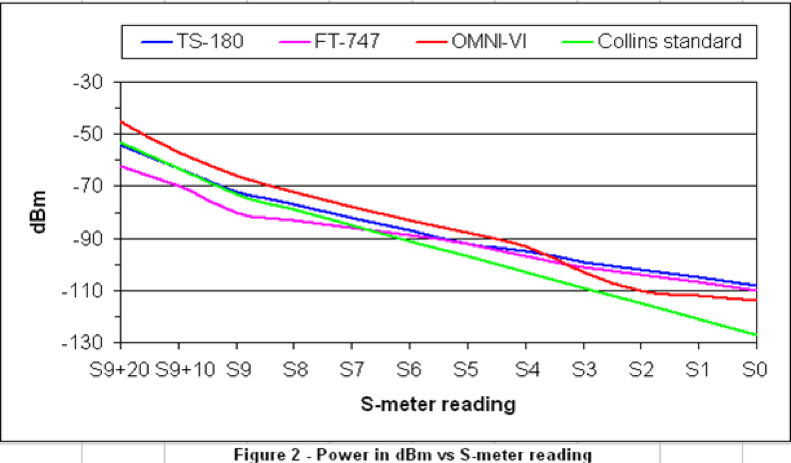
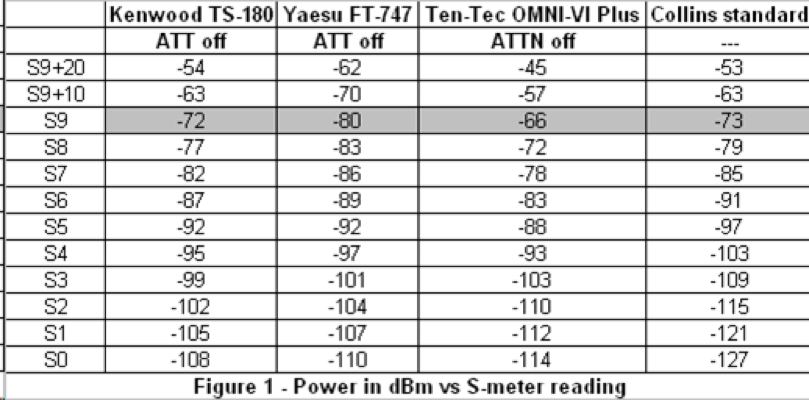
How do the S-meters on modern receivers compare to the Collins standard? Figure 1 gives tabular data (power in dBm versus S-meter reading) for three of my receivers on 20-Meters. Figure 2 graphs this data. These three receivers do not have a separate preamp switch, so all that is noted is the setting of the attenuator.


s_meter-fig1.png


s_meter-fig2.png


Three conclusions can be made from this data.

  1. The TS-180 comes closest to the anchor point of S9 = -73 dBm. The other two receivers are off by 7 dB (one is higher, one is lower).

  2. The TS-180 and the FT-747 exhibit approximately 5 dB per S-unit down to S3. The OMNI-VI is also about 5 dB per S-unit down to S4, but then takes a radical jump of 10 dB from S4 to S3

  3. Below S3, the S-meter on all receivers is only 2-3 dB per S-unit.

This data highlights why you need to calibrate your receiver if you’re doing any kind of serious work. For example, if you’re comparing antennas and one antenna is S2 and the other antenna is S1, you might conclude that the gain difference is 6 dB per the old Collins standard. But by knowing the calibration, the real difference in gain is only 2-3 dB.

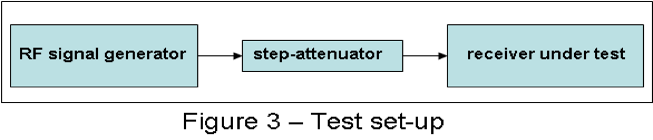
How do you calibrate your S-meter? The best way is to use a calibrated RF signal generator and a step-attenuator. Leave the receiver AGC on (otherwise the S-meter won’t work). Note the power in dBm at each S-unit value. Also record the attenuator setting and/or preamp setting. You may even want to take data at different combinations of the attenuator and preamp (if your receiver has separate controls). Note the power in dBm at each S-unit value. Figure 3 shows the test set-up.

s_meter-fig3.png

Finally, you should calibrate your S-meter on the different bands to be totally accurate. A good example for doing this is my OMNI-VI - on 160-Meters the delta between S-units is a dB or two different from the 20-Meter data, and the absolute power at S9 is several dB different compared to 20-Meters.


HamSCI UK Workshop 2017

By Dr. Cathryn Mitchell, M0IBG

A meeting bringing together both radio amateurs and radio scientists was held in the UK on the 13 October 2017, before the Radio Society Great Britain annual convention. This 'HamSCI' event, the first such meeting outside of the USA, was organized by Professor Cathryn Mitchell, M0IBG, (University of Bath) in association with her Natural Environmental Research Council (NERC) Knowledge Exchange fellowship. 

The invited talks were themed into three sessions. The workshop started with the topic ‘hams and scientists.’  The workshop opened with Nathaniel Frissell, W2NAF, New Jersey Institute of Technology, sharing the first results from the HamSCI community in the USA working on the 2017 solar eclipse.  William Liles, NQ6Z, then spoke about the many solar eclipse experiments that have progressed ionospheric science, from the earliest in 1912 to the very latest this current year.  Ben Witvliet, PE5B, described his journey from radio amateur to radio scientist and pointed to the notable differences in the approaches. 

Session two was themed ‘ionospheric propagation.’ Carl Luetzelschwab, K9LA, shared his top Outstanding Problems in Radio Propagation, demonstrating that the ionosphere is still not fully understood.  Steve Nichols G0KYA and RSGB Propagation Studies Committee Chairman, provided a comprehensive overview of the up to date propagation tools used by the radio amateur community. Marcus Walden, G0IJZ, Plextek, summarized the findings from an extended campaign of measurements at 5 MHz in the UK, which included the prevalence of the x mode for near-vertical-incidence-skywave.  Chris Deacon, G4IFX, showed very interesting results from his polarization observations at 50 MHz. 

The final session had three science presenters.  Prof Farideh Honary (University of Lancaster) described the public outreach projects on the aurora using magnetometers and an instrument called a riometer (measuring ionospheric absorption). Dr Ruth Bamford from the Rutherford Appleton Laboratory spoke about the exciting new ionospheric radar (EISCAT 3D), soon to be constructed in Northern Scandinavia.  The session finished with a talk on Anthropogenic Space Weather by Phil Erickson, W1PJE, MIT Haystack Observatory. This showed the effects that humans have had on our space environment over the past 60 years.

Dr Gary Bust (JHUAPL) and Jim Bacon, G3YLA, organized a discussion on the potential areas for the hams and scientists to work together.  Sporadic E, travelling ionospheric disturbances and auroral boundaries were the topics identified and the potential benefits of distributed HF measurements and suitable low-cost equipment was discussed. 

The conference talks sparked off lively debates and questions that highlighted the value of both amateur and professional scientists. It was a very interesting day with many new connections being made and the clear potential for starting collaborative experiments.  Both communities appreciated the chance to learn from each other and to understand the importance of space weather for radio system operations in different environments. Many thanks to the UK NERC for the sponsorship of the event.


Talks Group 1: Hams and Scientists

Talks Group 2: Ionospheric Propagation

Talks Group 3: Space Science Instrumentation

First HamSCI Eclipse Results at TAPR ARRL DCC

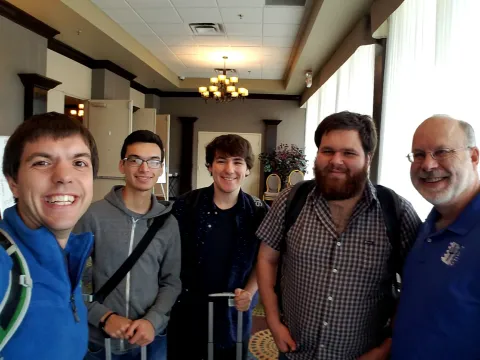
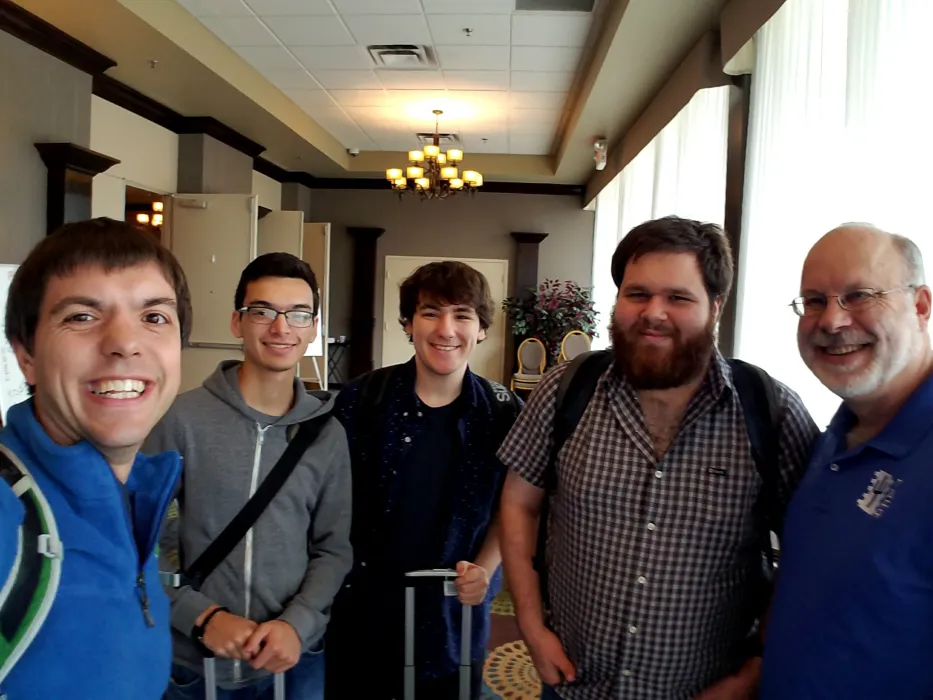
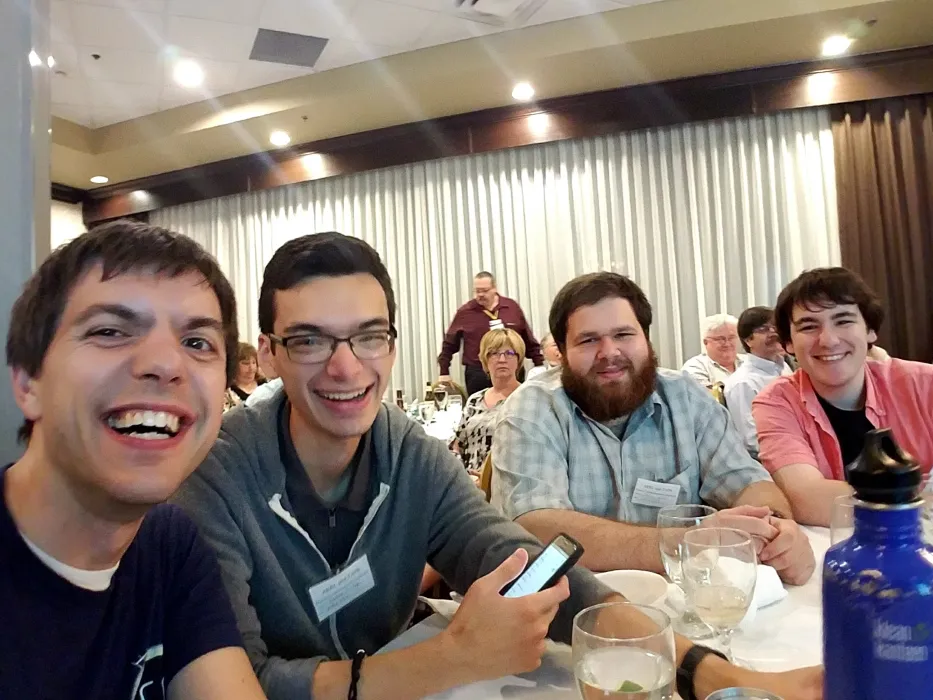
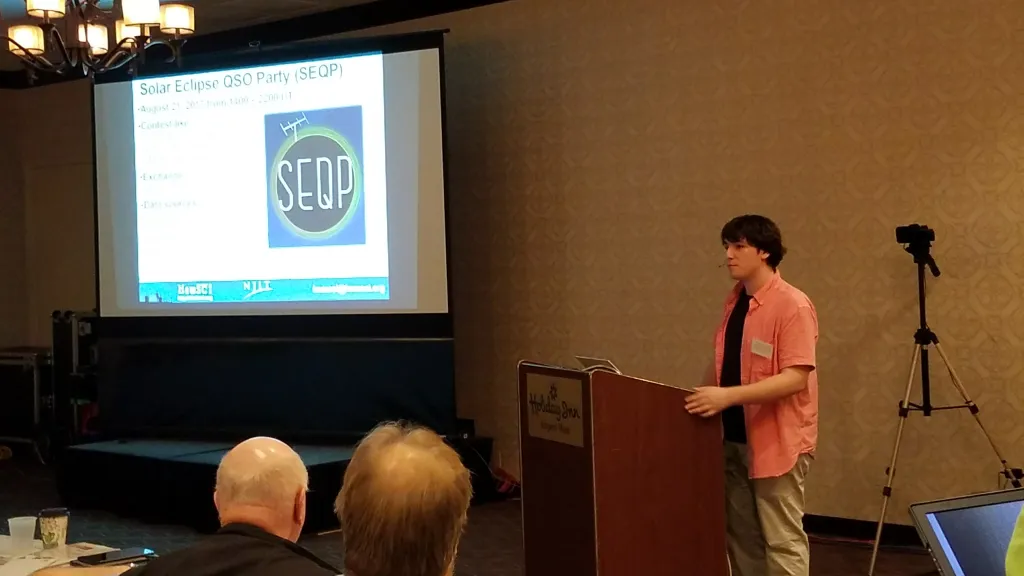
Photo: NJIT research professor Nathaniel Frissell W2NAF and NJIT students Josh Vega WB2JSV, Spencer Gunning K2AEM, Josh Katz KD2JAO with TAPR President Steve Bible N7HPR at the 36th Annual ARRL and TAPR Digital Communications Conference in St. Louis, MO.

Members of HamSCI presented at the 36th Annual ARRL and TAPR Digital Communications Conference September 15-17, 2017 in St. Louis, Missouri. The TAPR/ARRL DCC is an annual conference that attracts technically-minded amateur radio operators who specialize in building and designing hardware and software to support digital communications and radio.

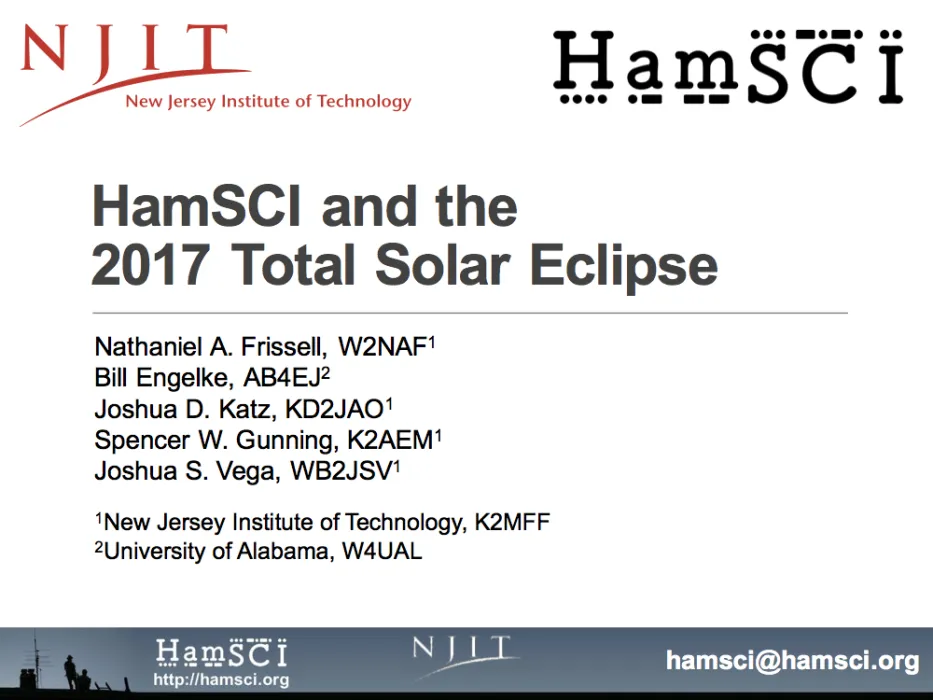
In a presentation entitled HamSCI and the 2017 Total Solar Eclipse HamSCI members Nathaniel Frissell W2NAF, Bill Engelke AB4EJ, Josh Katz KD2JAO, Spencer Gunning K2AEM, and Josh Vega WB2JSV showed initial results of the Solar Eclipse QSO Party and other HamSCI eclipse experiments. This presentation shows the number of 14 MHz RBN spots decreased while the number of 1.8 MHz and 3.5 MHz spots increased during totality, suggestive of a decrease in both maximum usable frequency and D-layer absorption during the eclipse. John Ackermann N8UR described his work in making wideband recordings during the eclipse in a presentation entitled How to Fill a Terabyte Disk: Using Software Defined Radios in the HamSCI Solar Eclipse Experiment. These preliminary results in both presentations suggests that the eclipse did have a significant effect on HF propagation.

In addition to the conference presentation, three NJIT HamSCI papers were also published in the conference proceedings. HamSCI and the 2017 Total Solar Eclipse by Nathaniel Frissell W2NAF et al. details the procedures for the HamSCI eclipse experiments. The H.A.R.C. Database and Visualization Utilities by Joshua Katz KD2JAO et al. describes a database for unifying RBN, PSKReporter, WSPRNet, and other amateur radio propagation data into one place for research purposes. Developing a Solar Eclipse Simulation for Greater Good by Joshua Vega WB2JSV describes how to simulate the SEQP using the PHaRLAP raytracing toolkit and SAMI3 model of the eclipsed ionosphere.

Finally, HamSCI team members announced the upcoming HamSCI Workshop that will be held at the New Jersey Institute of Technology in Newark, NJ February 23-24, 2018. This workshop will be open to public and focus on ham radio eclipse data analysis and the development of a personal space weather station. Details for workshop registration will be given at a later date.

The NJIT HamSCI team thanks TAPR and TAPR member David Bern W2LNX for supporting student attendance at the workshop.


Submitting eclipse observations to HamSCI

We've been contacted by several individuals regarding submission of observations of effects during the eclipse to HamSCI recently. Any such material - logs, reception reports, and records of other observations - is welcomed by HamSCI. We encourage you to email these to [email protected].

Larger data sets - raw I/Q data recordings or large audio files, for instance - can be submitted to the HamSCI community on Zenodo if they are too large to email. Create an account there to do this, or log in with your GitHub or ORCID account to do so. Zenodo has a 50GB limit per data set, so those of you who recorded multiple bands may need to submit each band as a separate data set. Thank you to everyone who took part in this and submitted observations of any kind!

SEQP Participants

Callsign Grid Square

SEQP Complete! Log & RBN Data Upload Page Available

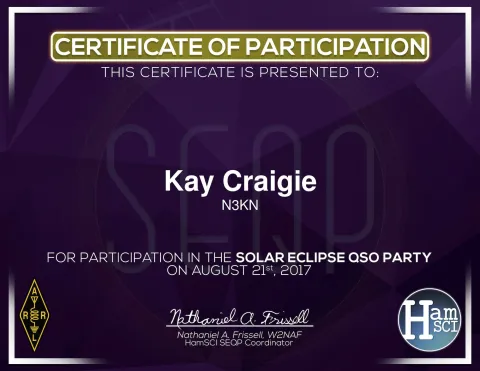
After eight short hours, the Solar Eclipse QSO Party has come to a close. Particpation was quite good. Although the final numbers are not yet in, preliminary reports show that over 670,000 spots were detected by the RBN, and over 542,000 spots were reported to PSKReporter during the SEQP. These numbers will increase as data is processed. SEQP participants are requested to submit their logs and RBN data (spots.txt) to hamsci.org/seqp. A PDF Certificate of Participation will be provided on log submission.

Participants in the Wideband Recording Experiment and those who made raw recordings from their RBN receivers are asked to upload their raw receiver data to Zenodo, following the instructions in the "Uploading to Zenodo" section of the Wideband Recording Experiment article. If it is not feasible to upload this much data, contact us at [email protected] so we can collect the data another way.

SEQP Today!

Figure: Model prediction of the eclipse at 302 km altitude on 21 August 2017 1815 UT, showing the modeled difference in electron density between the eclipse day and a normal day. Model results were create by J. Huba and D. Drob using the Naval Research Laboratory SAMI3 model. This figure is prepare by J. Vega and N. Frissell of NJIT. Published results are available in Geophysical Research Letters. Full text copies may be availble through your library.

Expected Operating Conditions

In just a few short hours both the Great American Eclipse and the SEQP will begin. Over 1300 stations have pre-registered, so activity levels are expected to be high. After a geomagnetically unsettled weekend, the solar activity appears to have calmed down. NOAA SWPC predicts this situation to continue today, with less than 1% chance of a major radio blackout, less than 1% chance of an S1 or greater Solar Radiation Storm, and no geomagnetic storm impacts. As such, propagation conditions should be good for HF radio operations.

Predictions and Operating Advice

It is expected that the shadow of the eclipse will cause a decrease in ionospheric electron density, strongest in the region of totality. Within this region, conditions will be most similar to night, and therefore lower band propagation should be enhanced because of a decrease in ionospheric absorption, while high band propagation should degrade due to a less dense ionosphere. SEQP operators are encouraged to follow the SEQP Rules and maximize their score and time on the air. The SEQP rules have been written to encourage many QSOs across many propagation paths. This should lead to a large dataset generated by the RBN, PSKReporter, WSPRNet, and participant submitted logs. All of these will be studied after the event to look for eclipse-induced ionospheric effects.

Log Submission

After the SEQP, please submit your logs at hamsci.org/seqp. Links to the submission pages will be posted by the end of the SEQP. A PDF Certificate of Participation will be generated for each submitted log.

Other Experiments

In addition to the SEQP, there are many other radio science experiments that you may participate in. This includes the Eclipse Frequency Measurement Test, Wideband Recording, operation of RBN and other automated receive nodes, EclipseMob VLF experiment, and the AM Broadcast Receive experiment. Please see hamsci.org/eclipse-get-involved for details.

SEQP Certificate Download

Thank you for submitting your log!

Please download your certificate by pressing the download button in the embedded PDF viewer.
Please be patient, certificate generation may take a few moments.


More Than 600 Stations Registered for SEQP

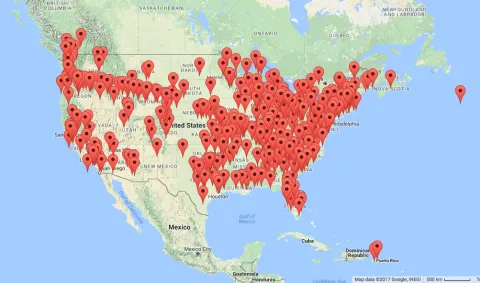
With only 5 days remaining before the Solar Eclipse QSO Party (SEQP), over 600 stations have already indicated that they are planning on participating. We have posted both a list and map showing the locations of all pre-registered stations. Stations are still encouraged to pre-register. Many stations have e-mailed asking for guidance as to what is the best band, mode, or antenna to use is. We recommend simply following the SEQP rules and enjoying this as you would any other operating event. We will be getting data from many, many different sources and need signals on all bands and modes. A link for log submission will be posted to hamsci.org/seqp by the end of the SEQP. See you on the air and good luck in the SEQP!

73,

Nathaniel W2NAF

Reverse Beacon Network and I/Q Recording Guides Updated

RBN activity screenshot

During the Solar Eclipse QSO Party, we'll be collecting data from the Reverse Beacon Network, a system which uses wideband SDR-based receivers called "skimmers" to decode CW and RTTY signals in large parts of the amateur HF spectrum and send decoded callsigns to a central server. During the contest, we'd like to have as many skimmers in operation as possible, as each skimmer adds another point of data. We'd also like skimmer operators to record the digitized RF data being captured by their receivers for later analysis by the HamSCI researches to spot unusual signal characteristics after the contest.

We've added new guides on how to run Reverse Beacon Network nodes on common SDRs. If you have a Red Pitaya, QS1R, or FLEX-6000 series SDR, it's easy to set up your radio to skim several bands at once and send spots to the RBN. And you can record the data that's being skimmed, even while the skimmer is operating! See our guides for skimming and recording on the Red Pitaya, QS1R, and FLEX series radios to get started. Other SDRs can be made to work also - if your SDR can send wideband I/Q data to CW Skimmer, it can work with the RBN.

RBN Data Submission

Following the SEQP, please upload your RBN spot data below.


FlexRadio Reverse Beacon Network & I/Q Recording How-To Guide

A FLEX-6000 series SDR transceiver or receiver can be operated as a Reverse Beacon Network node by using the DAX IQ stream feature to pass I/Q streams to CW Skimmer via the SDR-Bridge software. Recording of this I/Q data for submission to HamSCI can easily be performed as well. The FLEX-6300 and 6400 provide up to two 96KHz steams, and the 6500, 6600, and 6700 provide up to four 192KHz streams.

This guide documents the software configuration needed to skim one or more bands using a FLEX-6000 series transceiver. It assumes the user's computer already has a recent version of SmartSDR installed and working. It was written using SmartSDR v1.10.16.

Users with older FLEX series SDRs using the PowerSDR software (FLEX-1500, FLEX-3000, and FLEX-5000) can skim and record a single band by following instructions in this guide provided by FlexRadio Systems, then proceeding to the CW Skimmer Configuration section of this tutorial.


Notes

It is suggested, particularly for users of Windows 10, that you run Windows Update and install all available updates before beginning this procedure. In some cases it has been observed that major Windows updates break SmartSDR or SDR-Bridge components, and necessitate reinstallation of these programs before DAX and CAT work properly.

Users with radios capable of GPS reference clock stabilization should use this if they are able to do so, as this will result in excellent frequency stability of the recorded data.

CW Skimmer, along with SmartSDR, can consume significant system resources when many signals are on the air, as is expected during the Solar Eclipse QSO Party. Any first or second generation Core i5 or i7 quad-core CPU should be adequate for skimming several channels, and newer dual core systems are likely to work well as also. Older single and dual-core systems may not run well. A system was tested with two channels on a Core i7-2600K system with 8GB RAM, and ran very well. If the system becomes bogged down, minimize SmartSDR to reduce the CPU load.

Finally, it is possible to get the CW Skimmer/DAX interfaces into "weird" states, in which CW Skimmer is operating but is misaligned in frequency, or displays artifacts in the CW Skimmer band scope that are not seen in the SmartSDR panadapter. These issues have been observed most often following an abrupt shutdown or disconnect of the radio, but can occur in other cases as well. Below is an example of artifacts in CW Skimmer that were not seen on the radio panadapter:

In the situation in which the above screenshot was made, disabling the DAX IQ channel feeding CW Skimmer did not cause the two bright bands to disappear, as would be expected. In addition, the bands remained in place when the panadapter was tuned. Situations like this may necessitate restarting the computer and radio, or reinstalling some or all of the software. See the "Troubleshooting" link at the end of this procedure for possibly helpful resounces.

Software Installation

Several additional programs need to be installed at first. It is recommended that the default installation paths are accepted, particularly with CW Skimmer and SDR-Bridge. If they are not, additional configuration of these programs may be needed to ensure that CW Skimmer finds the updated configuration files created by SDR-Bridge for correct operation.

  1. Install SDR-Bridge from http://www.qrv.com/sdrbridge.html
  2. Install CW Skimmer from http://www.dxatlas.com/cwskimmer/ - the program will operate in trial mode for 30 days. Purchase a license to use it beyond this period.
  3. Download Reverse Beacon Network Aggregator from http://reversebeacon.net/pages/Aggregator+19 - this program is a portable .exe which does not require installation. Place it in any non-system folder (not in C:\Program Files or C:\Windows).
  4. Install the Meinberg NTP client (see next section).

Meinberg NTP Client Installation

If you plan to record the I/Q data, it is recommended to install the Meinberg NTP client from https://www.meinbergglobal.com/english/sw/ntp.htm to keep the PC's clock synchronized tightly during operation. Other NTP synchonization programs for Windows, such as Dimension 4, are also suitable. To complete this:

  1. Download the installer for the Meinberg NTP client from the above link, and begin the installation. Proceed until the "Files have been installed" screen:


  2. On this screen, the option "Want to use predefined public NTP servers?" is disabled by default. Change the option (shown above in yellow) to an appropriate region for your location.
  3. Complete the installation. It should be acceptable to use the SYSTEM account for the NTP client when asked.
  4. To ensure the NTP client is operating correctly, open the Start menu, and under "Meinberg", run "Quick NTP Status". A text window is displayed:


    In this output, each line denotes an NTP server to which NTP is using for time synchronization. When NTP is running correctly and has brought the clock within a reasonable synchronization, an asterisk will be displayed at the beginning of the line for one of the NTP servers. Once this state is achieved, NTP can be considered to be running correctly.

Note that if the NTP configuration file needs to be edited, it is necessary to then restart the NTP service. This can be accomplished by using the "Restart NTP Service" option in the Start menu program group, but in recent versions of Windows, it needs to be run as administrator to work. Alternatively, from a command prompt with administrator privileges, execute "net stop ntp", then "net start ntp".


SmartSDR Configuration

The following steps are done to configure SmartSDR to send IQ data to DAX:

  1. Start the radio and SmartSDR. Open one panadapter for each band you intend to skim. In each panadapter, open one slice receiver. Tune each slice to a frequency near the frequency range to be skimmed. In the screen below, the SDR has been set up for skimming the CW sections of 20M and 40M:


In this example, slice A is in the 20M band, and slice B is in the 40M band. Slices cannot be moved between panadapters - if you need to do this, close the slice, and use the "+ RX" button on the left to open it in the appropriate panadapter.


  1. In each panadapter, click on the DAX button on the left side of the panadapter. In the menu that appears, assign each panadapter a unique DAX channel:

In this example, the DAXIQ channel for the 20M panadapter is 1, and the DAXIQ channel for the 40M panadapter is 2.
 

  1. In DAX Control Panel under "IQ Streams", enable each stream by clicking the button next to the frequency. The buttons will appear blue when enabled (shown below.) Set the Sample Rate for each channel to 96000.


    The example shows a FLEX-6300, which provides two I/Q streams. Users of the FLEX-6500, 6600, or 6700 will have four streams available.


SDR-Bridge Configuration

SDR-Bridge handles the bridging of the DAX IQ data to one or more instances of CW Skimmer. Start SDR-Bridge with SmartSDR already running. SmartSDR should display a client connection announcement when this occurs. Then, do the following:

  1. Under the Edit menu, select Settings. In the box that appears, enter your callsign into the "Call" box for each channel (by default they are "F1EX", "F2EX", and such.) Close the window when done.
  2. Under the "Assign" column for each DAX channel, select the slice that was placed in each channel when SmartSDR was configured earlier:


  3. Click the "Skim" checkbox next to the first IQ channel to start CW Skimmer. Note that if this is the first time starting Skimmer, try this more than once if it doesn't start within a reasonable time.
  4. At first, CW Skimmer will likely be tuned to a frequency not within the DAX IQ frequency window. In SmartSDR, click and drag the panadapter background to adjust the panadapter frequency center. This should be enough to cause CW Skimmer to synchronize to the center frequency.

    At this point, Skimmer should be actively decoding the CW signals within the passband.

    Note that the Skimmer waterfall display should move smoothly, without hesitation or jerkiness. If not, it is likely that the decoder is not working properly either, and you are advised to restart it.
     
  5. To tune the 96KHz window, click and drag the panadapter in SmartSDR. The "Stream" column in SDR-Bridge gives the current passband limits. Adjust the passband to something appropriate for the CW band of the band.
  6. Repeat this procedure for each additional band to be skimmed. Each additional band being skimmed will open another instance of CW Skimmer.


CW Skimmer Configuration

Most of the CW Skimmer configuration is already done by SDR-Bridge, so no additional configuration should be needed to get decoding working. Additional configuration is needed, however, to enable the Telnet server in each Skimmer instance to send spots to RBN Aggregator.

  1. In CW Skimmer, open the View menu, and select Settings. Select the Operator tab. Fill in all of the fields correctly - in particular, it is important that your 6-character grid square is correct.
  2. Select the "Telnet" tab. Ensure that "Enable Telnet Server" is checked. The port and password should be left as is - this login is used by SDR-Bridge to control Skimmer when the panadapter center frequency is changed.

     
  3. Click OK to save the settings.


RBN Aggregator Configuration

The RBN Aggregator receives spots from the CW Skimmer instances and forwards them to the Reverse Beacon Network. The connection should be configured to receive spots from the CW Skimmer instances. No further configuration is needed for the connection to RBN. To connect RBN Aggregator to the CW Skimmer instances, do the following:

  1. Open RBN Aggregator by launching the .exe file.
  2. Under the "Connections" tab, enter your callsign, the password (if configured) and the port number for the first Skimmer instance, as configured in the previous step. If the port number was not modified, it should be 7310. The IP address can be left as default.

  3. Click Connect. After a few moments, Aggregator should display "Connected to the CW Skimmer operated by..." in green text.
  4. Go to the Skimmer Traffic tab, and watch spots from the primary Skimmer appear. If you see spots appearing, the primary Skimmer instance is connected to Aggregator.
  5. To connect the other Skimmer instance, go to the Secondary Skimmers tab. In this tab, enter the connection details for each of the second skimmers. Click the "C" button in each applicable row to connect that skimmer:


  6. Go back to the Skimmer Traffic tab, and ensure that spots appear from each skimmer. The number in the first column of each spot indicates which skimmer it originated from - skimmer 0 is the primary skimmer, and skimmers 1 and up (highlighted in the following screenshot) are from the Secondary Skimmers panel.

    Also note that not all spots are sent to the RBN network. Only spots with a "+" between the time and frequency are sent - spots with a "-" are not sent.


    At this point, configuration is complete and your Flex is running as an RBN Skimmer.


Raw I/Q Data Recording

Recordings of the raw I/Q data from the RBN nodes are valuable to the HamSCI project, and can easily be made using the built-in CW Skimmer I/Q recorder feature. A recording from a single 96KHz stream will generate about 560KB per second of data, or about 2GB per hour. Follow the procedure below to record I/Q data.

  1. In one of the Skimmer windows, click the I/Q Recorder icon to open the I/Q Recorder panel:


  2. Click the leftmost icon in the I/Q  Recorder panel to select the folder where the recordings will be saved to. Use a unique folder for each Skimmer instance, as the files are not named by band.


  3. Click the Record button to start recording. The recording continues until the Record button is clicked again. The files are named by date/time, and are split into a new file about once every hour.

    You should see the recording time incrementing. If it is not, then the recorder is not running. This is usually because the folder selected for the recording output is not writable.
     
  4. Repeat this procedure for the remaining Skimmer sessions.


Troubleshooting

For general issues getting SDR-Bridge and CW Skimmer working, refer to the excellent troubleshooting guide by Al, NN4ZZ.

Submitting recordings

After the contest ends, please follow the procedure under the "Uploading to Zenodo" section of the HamSCI Wideband Recording How-To Guide to upload the recordings. As Zenodo has a 50GB limit per data set, please upload the recording for each band as a separate data set where this makes sense. If it is not feasible to upload this much data following the contest, please contact HamSCI so we can make arrangements to get the data via another method.
QS1R Reverse Beacon Network & I/Q Recording How-To Guide

A QS1R SDR can be used in conjunction with CW Skimmer Server to operate an RBN receiver capable of receiving 7 bands simultaneously. While skimming can be performed using only CW Skimmer Server and RBN Aggregator, using the CWSL_Tee and CWSL_File software allows simultaneous decoding and I/Q data recording of each received band.

This guide documents the software configuration required to operate a QS1R in simultaneous skimming/recording mode. It assumes no software is already installed. Users who have already installed RBN Aggregator and CW Skimmer Server may skip the appropriate sections of this document, and focus on integrating CWSL_Tee and CWSL_File with their existing installations.


Notes

It is suggested, particularly for users of Windows 10, that you run Windows Update and install all available updates before beginning this procedure. It is undesirable for the system to reboot automatically during the data collection period, particularly if it is left unattended.

CW Skimmer can consume significant system resources when many signals are on the air, as is expected during the Solar Eclipse QSO Party. Any first or second generation Core i5 or i7 quad-core CPU should be adequate for skimming several channels, and newer dual core systems are likely to work well as also. Older single and dual-core systems may not run well. A system was tested with several channels on a Core 2 Duo E6750 system, and it ran very well. It is recommended not to run any SDR software such as HDSDR simultaneously, as this consumes significant CPU resources.

Software Installation

Several additional programs need to be installed at first.

  1. Install CW Skimmer Server from http://www.dxatlas.com/cwskimmer/ - the program will operate in trial mode for 30 days. Purchase a license to use it beyond this period.
  2. Download Reverse Beacon Network Aggregator from http://reversebeacon.net/pages/Aggregator+19 - this program is a portable .exe which does not require installation. Place it in any non-system folder (not in C:\Program Files or C:\Windows).
  3. HDSDR, while not needed for operating CW Skimmer, may be used to verify that CWSL_Tee is working properly, and that recorded I/Q files worked as expected. Its use is referenced in this document, and it may be downloaded from http://www.hdsdr.de/.

Meinberg NTP Client Installation

If you plan to record the I/Q data, it is recommended to install the Meinberg NTP client from https://www.meinbergglobal.com/english/sw/ntp.htm to keep the PC's clock synchronized tightly during operation. Other NTP synchonization programs for Windows, such as Dimension 4, are also suitable. To complete this:

  1. Download the installer for the Meinberg NTP client from the above link, and begin the installation. Proceed until the "Files have been installed" screen:


  2. On this screen, the option "Want to use predefined public NTP servers?" is disabled by default. Change the option (shown above in yellow) to an appropriate region for your location.
  3. Complete the installation. It should be acceptable to use the SYSTEM account for the NTP client when asked.
  4. To ensure the NTP client is operating correctly, open the Start menu, and under "Meinberg", run "Quick NTP Status". A text window is displayed:


    In this output, each line denotes an NTP server to which NTP is using for time synchronization. When NTP is running correctly and has brought the clock within a reasonable synchronization, an asterisk will be displayed at the beginning of the line for one of the NTP servers. Once this state is achieved, NTP can be considered to be running correctly.

Note that if the NTP configuration file needs to be edited, it is necessary to then restart the NTP service. This can be accomplished by using the "Restart NTP Service" option in the Start menu program group, but in recent versions of Windows, it needs to be run as administrator to work. Alternatively, from a command prompt with administrator privileges, execute "net stop ntp", then "net start ntp".

CW Skimmer Server & RBN Aggregator configuration

CW Skimmer Server and RBN Aggregator require minimal configuration to integrate them with the Reverse Beacon Network after their installation.

  1. Start Skimmer Server. Under the Operator tab, enter your name, callsign, and grid square.
  2. Leave the settings in the Telnet tab at their defaults - this should allow RBN Aggregator to connect without any additional configuration.
  3. Start RBN Aggregator by double-clicking the file. Under the Connections tab, enter your callsign in the Callsign box, then click Connect. RBN Aggregator should then retrieve the name and grid square from Skimmer Server when it connects. If this occurs, RBN Aggregator is now receiving spots from Skimmer Server.

CWSL_Tee Configuration

In a configuration with CW Skimmer Server and a QS1R, Skimmer Server interfaces directly with the QS1R. This simplifies operation, but in such a configuration no other programs can access the data from the QS1R. The CWSL_Tee.dll library allows multiple programs to access the data streams coming from the QS1R - in this usage case, CWSL_Tee allows Skimmer Server to operate live while CWSL_File simultaneously records the data to the hard drive.

To configure Skimmer Server to run behind CWSL_Tee, do the following:

  1. Download CWSL_Tee.dll, CWSL_Tee.cfg, and CWSL_File.exe from https://github.com/HrochL/CWSL - look under the 'bin' subdirectory.
  2. At the above link, follow the procedure in the description, labeled "Installation procedure is as follows". Note that while CWSL_Tee.dll and CWSL_Tee.cfg should be placed in the Skimmer Server directory (typically C:\Program Files\Afreet\SkimSrv), CWSL_File.exe should be placed in any folder on the hard drive which will be used to store the recorded data, as this program does not have an option to direct its output files to another folder or drive.
  3. Turn on the QS1R and connect it to the computer. Start CW Skimmer Server. At this point, CW Skimmer will likely connect to the QS1R, load the FPGA code, and start operating. Select the bands that should be skimmed using the checkboxes in the 'Skimmer' tab.
  4. Under the 'Skimmer' tab on Skimmer Server, set the 'Receiver' option to 'CWSL_Tee' as shown below:


  5. Close Skimmer Server by right-clicking on its System Tray icon. Power off the QS1R, then power it on again. Start Skimmer Server and verify that CWSL_Tee is still selected as the receiver. At this point, Skimmer Server should be receiving data from the QS1R through CWSL_Tee.

To verify that CWSL_Tee is in use, open HDSDR. When the "Choose which External HW should be used by HDSDR" box appears, select 'Extio_CWSL.dll'. The SDR should begin operating, and a band select window should appear:

If this window is present, HDSDR is receiving data through CWSL_Tee, and it should be possible to set up the recorders. Note that in this mode, the HDSDR IF cannot be tuned - this is because each 192KHz data stream is fixed in frequency by Skimmer Server.

At this point, you can start RBN Aggregator and connect it to Skimmer Server.

Recording

Once Skimmer Server is operating through CWSL_Tee, the CWSL_File program is used to record the data from a given band. This program is run via the command line, and records a single band per instance. Therefore, to record every band being skimmed, multiple instances of CWSL_File are run simultaneously.

Note that CWSL_Tee should not be placed in the C:\Program Files or C:\Program Files (x86) directories - these are not writable without administrator privileges, and attempting to record to these directories will result in no file output.

Recording a 192KHz band segment was observed to produce slightly under 1MB/s of sustained disk writes. At this rate, recording 7 bands for 24 hours would produce about 440GB of output. It is expected that any modern 1TB or greater hard drive should provide enough write bandwidth to sustain the recording of 7 bands simultaneously for the duration of the event.

To initiate recording follow the procedure below:

  1. Open a command prompt. Navigate to the directory in which CWSL_File.exe is located.
  2. Run CWSL_File.exe without any arguments to display the usage information. Note the BandNr and Scale Factor arguments - each of these is a single number.

    For the QS1R, the Scale Factor should be set to 8. The BandNr argument is a number from 0 - 6 representing one of the selected bands. In Skimmer Server,  under the 'Skimmer' tab, band 0 is the first selected band, band 1 is the second, and so forth. This is shown in the screenshot below, in which the red numbers next to the band segment selection panel denote the BandNr that corresponds to each band.

    Additionally, the -L argument should not be used, such that the filenames are generated using UTC times rather than local times. It is recommended that the '-Q' argument is used such that CWSL_File makes a new output file every 15 minutes. This ensures that as many timestamps as possible are recorded during the recording session.

  3. Start the first recorder, using a command line such as 'cwsl_file 0 8 -Q'. The output should look like the following:


    The first band is now being recorded. Leave the command prompt in this state until it is time to stop recording, then stop the program via Ctrl-C.
     
  4. Start the remaining six recorders using the above procedure, incrementing the BandNr by 1 for each other recorder. Note that each recorder doesn't need to be in its own folder - the files are named uniquely by band. Below is what a typical recording session will look like:


Verifying recordings

HDSDR can be used to replay recordings made with CWSL_File, which is useful in verifying that the recording was made correctly. To do this, open HDSDR, then click the green Play button. Select the file to be replayed, then verify that the replay contains the expected signals. During this, you can power off the QS1R to ensure that the data is coming from the recording, and not from the receiver.

Submitting recordings

After the contest ends, please follow the procedure under the "Uploading to Zenodo" section of the HamSCI Wideband Recording How-To Guide to upload the recordings. As Zenodo has a 50GB limit per data set, please upload the recording for each band as a separate data set where this makes sense. If it is not feasible to upload this much data following the contest, please contact HamSCI so we can make arrangements to get the data via another method.
 

SEQP Log Submission

SEQP Logs must be submitted by Saturday, September 30, 2017 at 2359 UTC.
Rules for the SEQP can be found here.

Please note that Microsoft Internet Explorer (IE) is not compatible with this form. Please use Google Chrome or Mozilla Firefox.
Personal Information

Optional Bonuses


    • (100 points)


      (100 points)


      (100 points)
Antenna Information

Wideband Recordings

Automated Receiver Node Operations

Miscellaneous

RSVP for the SEQP

The Solar Eclipse QSO Party (SEQP) is just a few short weeks away! The SEQP is a special operating event organized by the Ham Radio Science Citizen Investigation (HamSCI) to study ionospheric effects caused by the August 21, 2017 Total Solar Eclipse. During the SEQP, hams are asked to operate on the HF bands in a manner similar to contests or QSO parties. Systems such as the Reverse Beacon Network (RBN, www.reversebeacon.net), PSKReporter (pskreporter.info), WSPRNet (wsprnet.org), and participant logs will provide the QSO and spot data that will be used by researchers at the New Jersey Institute of Technology and Virginia Tech to study eclipse-induced ionospheric effects. Full event rules and operating procedures are available at hamsci.org/seqp. Let us know where you plan to be and what modes you plan to operate. To do this, visit the SEQP Pre-Registration page at hamsci.org/seqp-prereg. We look forward to hearing you on the air!

73,

Nathaniel W2NAF

----------

Nathaniel Frissell

Assistant Research Professor

New Jersey Institute of Technology

SEQP Pre-Registered Participants


Callsign Grid Square Using CW? Using Digital? Using Phone?

Thank you!

Thank you for pre-registering for the SEQP!

You will now be redirected to the list of SEQP participants.

SEQP Pre-Registration

Getting Spotted by the RBN

How do you make sure you are spotted by the RBN?

The RBN is made up of automated receivers running the CW Skimmer Server or RTTY Skimmer and RBN Aggregator software. In order to be spotted, these pieces of sotfware must recognize your transmission as (1) calling CQ and (2) having a valid call sign.

The automated "CW Skimmer" receivers will decode any transmission beginning with CQ or other words indicating the station is soliciting QSOs. i.e. "running."  CQ words include TEST or QRZ, for example.  The CQ word may have one other word between the CQ word and the call sign.  For example, "CQ TEST", "CQ SEQP", "TEST SEQP", "QRZ SEQP", and so forth will be detected as a CQ if they are followed by a call sign.  "CQ TEST N0AX" or "CQ SEQP N0AX" will work equivalently.  It is important, however, to send the entire message at the same speed and do not speed up parts of the message in order to save time.

In addition to the CQ-equivalent keyword, the Skimmer programs must be "convinced" that the callsign is really a callsign.  For this purpose Skimmers use a file which determines whether a prefix pattern has been used on the air recently, and divides prefixes into 3 classes - unknown, encountered infrequently, and common.  Calls with unknown prefixes - such as some of the special commemorative prefixes beloved by Europeans - can require up to 4 repetitions before they are spotted, while other common ones like N4 can require as few as two. 

As a practical matter, contesters have discovered that  a new prefix can lead to many fewer spots than a more common one, so people should be encouraged to avoid using exotic callsigns during SEQP. Most US 1x1 calls should by ok, as these are used frequently and their pattern should already be established. The Commemorative Canada 150 prefixes will also work fine as they have been explicitly added to the RBN pattern file in January 2017.


HAARP Open House 19 August, September campaign

By Dr. Chris Fallen, KL3WX
Geophysical Institute - Uniervsity of Alaska, Fairbanks
 
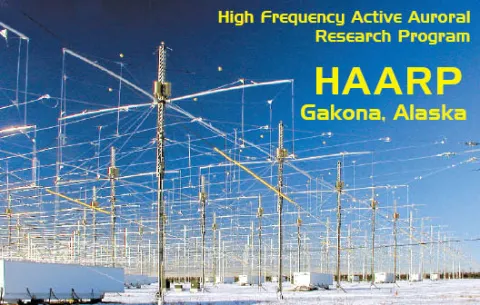
The next HAARP open house will occur on 19 August 2017 and include round-trip bus transportation from Fairbanks for $45 which will help bring costs down for individuals, particularly for those from out of town. Throughout the day there will be talks by Geophysical Institute researchers on-site about the HAARP facility and research, and other research topics pursued at the UAF Geophysical Institute. As in the previous year, tours of the main transmitter array, control center, and power generation plant will be offered throughout the day. Hams and radio enthusiasts are encouraged to bring their equipment for photo opportunities or even to make contacts from the site. 
 
The next HAARP campaign will occur approximately during the "new moon" in September and will largely be continuations of research experiments from the previous campaigns. Similar to the February campaign, information regarding selected experiment activities will be announced, allowing hams and SWLers to tune in and collectively participate. One notable difference from the previous campaign is that another column of transmitter shelters at HAARP will be be operational, both increasing the HAARP net transmitted power to 80% of its nominal 3.6 megawatts and increasing its antenna gain.
 
Additional information and updates are available through UAF HAARP website and the Gakona HAARPoon blog.

Listen to the Arecibo Observatory on HF

By Dr. Chris Fallen, KL3WX
Geophysical Institute - University of Alaska, Fairbanks

The Arecibo ionospheric HF heating facility will be operational for a research campaign from 24 to 31 July 2017. Because the facility transmits on the HF frequencies 5.125 and 8.175 MHz, it is possible that its signals can be heard world-wide. QSL cards are available for interested SWL. The new Arecibo ionosphere HF heater nominally transmits 600 kilowatts net power (100 to 200 megawatts effective radiated power) and has a unique Cassegrain dual-array antenna design that increases the gain of three crossed dipoles for each band using the signature 1000 ft spherical dish reflector.


During the upcoming campaign, the Arecibo HF transmitter is limited to two frequencies, 5.125 and 8.175 MHz. Campaign HF transmissions will start at approximately 1600 hours UTC on 24 July 2017 and be active approximately 24 hours per day, with some occasional downtime for maintenance and other activities lasting one or more hours.  Generally, the 8.175 MHz transmissions will occur in the daytime when foF2 is expected to exceed that value, between approximately 1830 and 2230 hours UTC. Otherwise the HF transmissions will occur at 5.125 MHz. The Arecibo incoherent scatter radar (ISR) will also be active throughout most of the campaign, but since it operates in the UHF band at 430 MHz long distance propagation is not expected.


These transmissions will be in the vertical direction so this is an excellent opportunity to observe NVIS from a powerful transmitter in Puerto Rico. Dr. Chris Fallen, KL3WX, will be conducting an experiment using O-mode polarized CW for measuring plasma wave and turbulence effects. Experiments by other scientists may use X-mode polarization. To the best of Chris's knowledge, all experiments will be CW with no amplitude or frequency modulation. 

SWL QSL cards are available by sending an SASE to W3HNK, the QSL manager for KP4AO, the Arecibo Amateur Radio Club. Special thanks to Angel, WP3R, the president and trustee of KP4AO and Arecibo Head of Telescope Operations and Spectrum Manager for the QSL information.